


IBM DOORS Next is a modern requirements management tool for organizations that need to capture, structure, review, trace and maintain requirements in complex systems and software development. The tool is often used as the requirements management part of IBM Engineering Lifecycle Management, where requirements can be linked to testing, workflows, design, baselines, reports and other parts of the development lifecycle.
In this guide, we go through what DOORS Next is, how the tool is used in requirements management, which central concepts are important to understand, how traceability and configuration management work and what organizations should consider to gain real value from DOORS Next.
What is IBM DOORS Next?
IBM DOORS Next is a requirements management tool that helps organizations define, document, organize, link, review and follow up requirements. It is mainly used in environments where there are many requirements, where several roles need to collaborate and where traceability between requirements, testing, design and development work is important.
DOORS Next is based on a web-based user environment and is often used together with other IBM ELM applications. Requirements can be managed as artifacts with attributes, status, comments, links, history and relationships. This means that requirements are not just text in a document, but data that can be filtered, traced, reported and configuration-managed.
A simple description is that DOORS Next helps the organization answer five questions:
- Which requirements exist?
- Where do the requirements come from?
- Which requirements are approved, changed or under review?
- Which requirements are linked to tests, design and development work?
- Which requirements version applies to a certain release, variant or baseline?
This makes DOORS Next especially useful in larger projects, regulated industries and organizations where requirements management must be both flexible and controlled.
Why is DOORS Next used for requirements management?
Requirements management often becomes difficult when the organization grows. Files are sent back and forth, requirements exist in several versions, the test team does not know which requirements are current and project management lacks an overview of status. DOORS Next is designed to reduce this kind of uncertainty.
The tool gathers requirements in a shared environment where teams can work with structure, review, traceability and status in a more controlled way. This makes it easier to see both the content of the requirements and the relationships between the requirements and the other parts of the development work.
Important benefits of DOORS Next
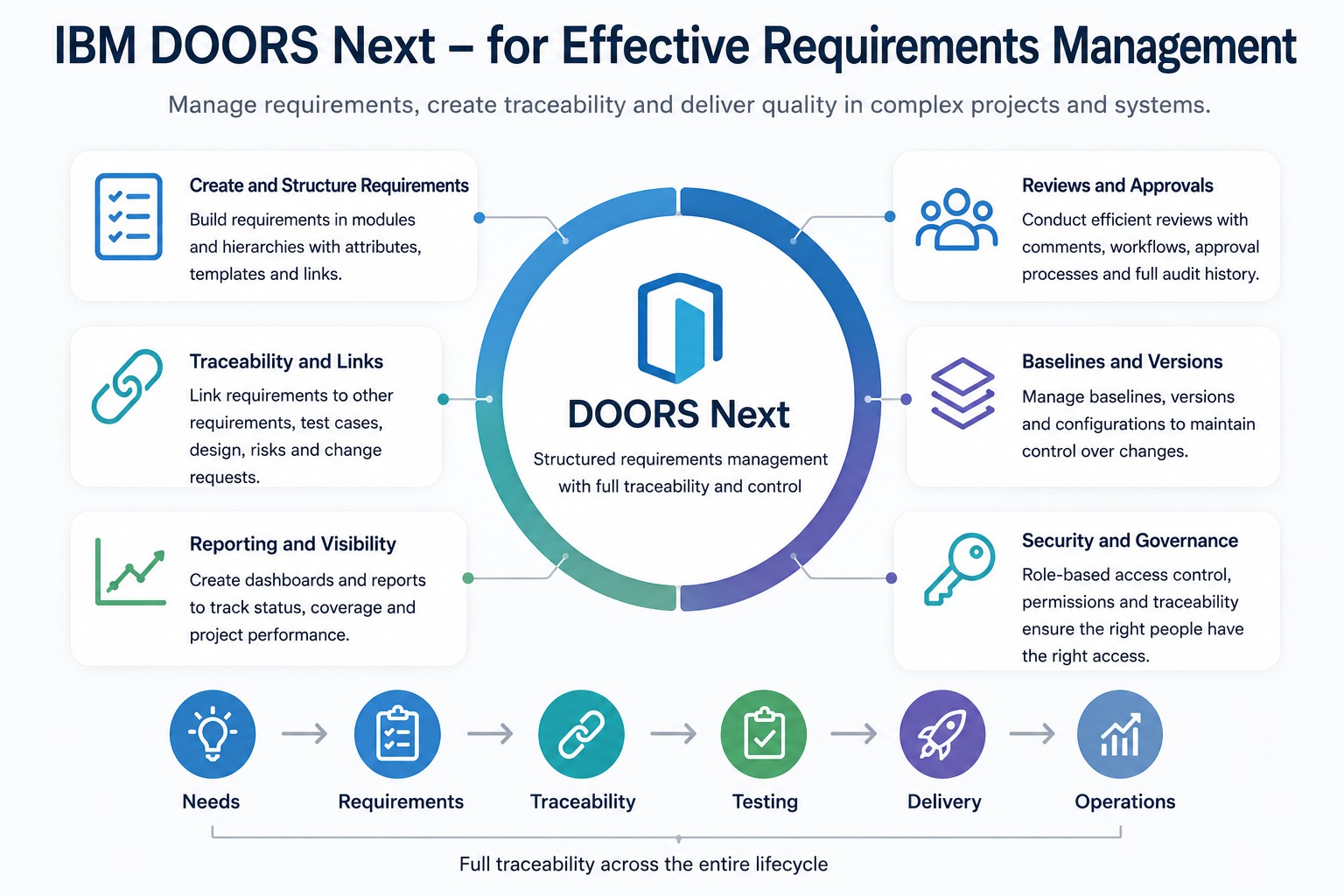
- Central requirements management: Requirements are gathered in a common requirements repository instead of scattered documents.
- Better requirements structure: Modules, folders, attributes and views make it easier to manage large sets of requirements.
- Traceability: Requirements can be linked to other requirements, test cases, work items, risks and design objects.
- Controlled reviews: Review workflows help teams comment on, approve and follow up requirements.
- Configuration management: Streams, baselines and change sets make it possible to manage versions and parallel development.
- Reporting: Dashboards and reports can show status, test coverage, changes and traceability.
- Scalability: The tool can support large projects, many users and complex requirements structures.
For an organization that wants to improve its requirements management, DOORS Next is therefore not only a place to write requirements. It is a tool for controlling and maintaining requirements throughout the entire lifecycle.
DOORS Next and IBM ELM
DOORS Next is the requirements management application in IBM Engineering Lifecycle Management, often abbreviated IBM ELM. This means that DOORS Next can be used as part of a larger tool environment where requirements, testing, workflows, design, reporting and configurations are connected.
In practice, this means that a requirement in DOORS Next can be linked to a test case in IBM Engineering Test Management, a work item in IBM Engineering Workflow Management or a configuration in Global Configuration Management. In this way, the requirement becomes part of a digital thread through the development work.
Examples of links in IBM ELM
- DOORS Next to ETM: Requirements are linked to test cases and test results.
- DOORS Next to EWM: Requirements are linked to work items, defects and development plans.
- DOORS Next to Rhapsody Model Manager: Requirements can be related to models and design artifacts.
- DOORS Next to Global Configuration Management: Requirements are included in versions, baselines and product variants.
- DOORS Next to reporting: Requirement status, traceability and coverage can be shown in reports and dashboards.
IBM DOORS compared with DOORS Next
The terms IBM DOORS and IBM DOORS Next are sometimes confused. Both are requirements management tools from IBM, but they have different technical foundations and different strengths.
| Area | IBM DOORS | IBM DOORS Next |
|---|---|---|
| Interface | Traditional client-based environment with a long history in requirements management. | Web-based environment with focus on collaboration and integration in IBM ELM. |
| Strength | Mature solution for large requirements databases, structured modules and customization. | More modern collaboration platform with dashboards, reviews, links and ELM integration. |
| Integration | Can be integrated with other tools through established APIs and methods. | Designed for integration with ETM, EWM and other ELM applications. |
| Collaboration | Strong in traditional requirements environments, often with clear document and module structure. | Supports web-based collaboration, comments, review workflows and shared dashboards. |
| Configuration management | Baselines and established requirements management functions. | Streams, baselines, change sets and global configurations in an ELM environment. |
| Typical use | Organizations with an established DOORS environment and large historical requirements databases. | Organizations that want web-based requirements management and stronger lifecycle integration. |
Which tool is most suitable depends on the organization’s current state, history, integration needs, processes and future goals. In some organizations, both tools are used during a transition period or for different parts of the business.
Basic concepts in DOORS Next
To work effectively in DOORS Next, you need to understand a few central concepts. They affect how requirements are structured, reviewed, linked and reported.
Artifacts
An artifact is an object in DOORS Next. It can be a requirement, a heading, a use case, a diagram, an image, a definition, a process description or other information that supports requirements management.
Artifact types
Artifact types are used to distinguish between different types of information. An organization can, for example, have types such as business requirement, stakeholder requirement, system requirement, risk, regulatory requirement, use case and glossary term.
Attributes
Attributes are metadata that describe the artifact. This can include priority, status, owner, source, requirement type, risk level, release, variant or verification method.
Links
Links show relationships between artifacts. A requirement can, for example, be linked to a higher-level requirement, a test case, a work item, a risk or a regulatory source.
Views
Views are used to show the right information to the right role. A requirements analyst may want to see source, status and priority. A test manager may want to see verification method and test coverage.
Modules
Modules are used to create structured requirements documents with order, headings and hierarchy. They resemble a requirements specification, but each requirement can still be a traceable artifact.
Modules, collections and requirements structure
DOORS Next can organize requirements in several ways. Two important concepts are modules and collections.
A module is used when requirements need to be presented and managed as a structured document. The module can have headings, subheadings, numbering, order and hierarchy. This is useful for requirements specifications, system requirements, regulatory requirements and other structured documents.
A collection is used to group artifacts without the same clear document hierarchy. It can, for example, be used for a review, a delivery, a milestone, a subsystem or a feature.
When are modules suitable?
- When the requirements should be read as a requirements specification.
- When order, chapters and hierarchy are important.
- When requirements should be reviewed in a clear document structure.
- When you want to export requirements in a more document-like format.
- When requirements need to be managed with views, filters, attributes and links in the same structure.
When are collections suitable?
- When a group of requirements should be gathered for a review or milestone.
- When requirements should be connected to a test area, iteration or feature.
- When the order is less important than the selection itself.
- When you want to gather artifacts from different parts of the project.
Attributes, metadata and views
Attributes are one of the most important parts of DOORS Next. They make it possible to sort, filter, prioritize, review and report requirements. Without good attributes, requirements easily become just text. With good attributes, they become controllable information.
Common attributes in requirements management
- Requirement type: For example business requirement, system requirement, regulatory requirement or non-functional requirement.
- Status: New, under analysis, under review, approved, rejected, implemented or verified.
- Priority: Critical, high, medium, low or according to a model such as MoSCoW.
- Owner: The role or person responsible for the requirement.
- Source: Customer, standard, legal requirement, risk analysis, product strategy or another source.
- Verification method: Test, analysis, review, demonstration or inspection.
- Release or variant: Which version, product variant or delivery the requirement belongs to.
Examples of useful views
- Requirements without an owner.
- Approved requirements in a certain release.
- High-risk requirements without a test link.
- Requirements changed since the latest baseline.
- Regulatory requirements by source or standard.
- Requirements under review by responsible role.
A good principle is that every attribute should have a clear use. If no one uses the attribute for governance, review, filtering or reporting, you should question whether it is needed.
Traceability and links
Traceability is one of the main reasons why organizations use DOORS Next. By linking requirements to other artifacts, the team can understand where requirements come from, what they affect and how they are verified.
Traceability can be used at several levels:
- Upward: From detailed requirements to higher-level needs, goals or regulatory sources.
- Downward: From high-level requirements to system requirements, component requirements or detailed requirements.
- Sideways: Between requirements that depend on each other or affect the same function.
- Forward: From requirements to design, implementation, test cases and test results.
- Backward: From a test, defect or work item back to the requirement that motivates the work.
Example of a traceability chain
- Regulatory source: A requirement from a law, standard or industry regulation.
- Stakeholder requirement: The organization’s interpretation of what the source means.
- System requirement: A concrete requirement for the system’s function or characteristic.
- Design object: A design decision or model object that realizes the requirement.
- Test case: A test that verifies that the requirement is fulfilled.
- Test result: The result that shows whether the requirement has passed or not.
When requirements are linked, the organization can perform better impact analysis. If a requirement changes, the team can see which other requirements, test cases, work items or design objects are affected.
Review, comments and approval
Requirements need to be reviewed before they become governing. In DOORS Next, teams can create review workflows where participants review artifacts, modules or collections. Participants can comment, approve, reject or abstain depending on role and process.
The review function makes review part of the tool environment instead of a separate activity in email or documents. It creates a better overview of who has reviewed what, which comments exist and which requirements are ready for decision.
What should be reviewed?
- Whether the requirement is clear and unambiguous.
- Whether the requirement has the right source and owner.
- Whether the requirement is feasible.
- Whether the requirement is testable.
- Whether priority and risk level are reasonable.
- Whether the requirement is consistent with other requirements.
- Whether links and dependencies are correct.
Practical review process
- Select which modules, collections or artifacts should be reviewed.
- Define participants and roles.
- Send the review request with clear instructions.
- Let participants comment, approve or reject.
- Handle comments and update requirements.
- Document decisions and status.
- Create a baseline when the set of requirements should be frozen.
Baselines, streams and change sets
In larger requirements management environments, teams need to manage versions. DOORS Next supports configuration management, where requirements can be included in streams, baselines and change sets.
Baseline
A baseline is a frozen version of the requirements information at a specific point in time. It can be used as a reference for review, release, testing, procurement or audit.
Stream
A stream is an active workspace where teams can change artifacts. Streams are often used for parallel development, for example when an organization works on one release while the next version is being developed.
Change set
A change set is a group of changes that can be kept separate before being delivered to a stream. It can help teams review and control changes before they affect the shared set of requirements.
Without version control, it becomes difficult to know which requirements version forms the basis for testing, development and delivery. With baselines and streams, the organization can manage change without losing history and control.
Import, export and migration
Many organizations do not start from an empty state. Requirements may already exist in Word, Excel, older DOORS databases, ReqIF files or other requirements tools. DOORS Next supports several forms of import and export, but migration should be planned carefully.
Common import and export scenarios
- Word documents: Requirements documents can be imported and split into artifacts.
- Excel and CSV: Requirements and attributes can be imported, exported and in some cases used in round-trip workflows.
- ReqIF: Used for exchanging requirements and metadata between requirements tools and organizations.
- DOORS migration package: Can be used when migrating from IBM DOORS to DOORS Next.
- Report export: Views and reports can be used to create material for review and documentation.
Things to consider during migration
- Which requirements should be migrated and which should be archived?
- Which attributes need to be included?
- How should old links and relationships be handled?
- Should history be migrated, linked or preserved in the old system?
- Which modules and hierarchies need to be rebuilt?
- How should the quality of imported requirements be checked?
A well-planned migration is both technical and methodological. It is not only about file formats, but about creating a requirements environment that works long term.
Integrations with testing, development and design
DOORS Next becomes most valuable when it is not used in isolation. Through IBM ELM, requirements can be connected to testing, workflows and design. This allows the organization to follow requirements from need to verification.
Integration with IBM ETM
Requirements can be linked to test plans, test cases and test results in IBM Engineering Test Management. This allows the team to see which requirements are verified, which lack test coverage and which tests have failed.
Integration with IBM EWM
Requirements can be linked to work items, defects, tasks and plans in IBM Engineering Workflow Management. This makes it easier to follow how requirements are turned into actual work.
Integration with modeling and design tools
In systems development, requirements may need to be linked to models, architecture or design decisions. This is especially important in model-driven development and in projects where the system structure must be traceable back to requirements.
Integration with external tools
DOORS Next can also be integrated with other tools through standards and interfaces, for example OSLC and ReqIF. This is important when suppliers, customers or other departments use different tools but still need to exchange requirements information.
Reporting and dashboards
Reporting in DOORS Next is about making requirements data useful. When requirements have attributes, statuses, links and relationships, the team can create views, dashboards and reports that show how the work is progressing.
Examples of useful reports
- Requirements by status, requirement type or release.
- Requirements that lack a test link.
- Requirements that lack an owner or source.
- Requirements changed after the latest baseline.
- Requirements under review but not approved.
- Traceability between regulatory requirements, system requirements and test cases.
- Test coverage and verification status for a delivery.
- Open defects linked to high-priority requirements.
Reports are only as good as the data they are based on. If attributes are used inconsistently, if links are missing or if statuses are not updated, the reports will be misleading.
Administration and project configuration
A well-functioning DOORS Next environment requires administration. This is not only about user accounts, but also about how requirement types, attributes, data types, links, permissions, templates and processes should work.
Important administration areas
- Project areas and components: How the environment is divided between projects, products and teams.
- Artifact types: Which types of requirements and supporting artifacts should exist.
- Attributes and data types: Which metadata is needed for governance, filtering and reporting.
- Link types: Which relationships should be used for traceability.
- Permissions: Who may read, create, change, review and approve.
- Templates: How new projects, modules and requirements structures should be created.
- Reviews and workflows: How review, decisions and status changes should be handled.
- Reports and dashboards: Which information should be followed up and how.
Implementing DOORS Next step by step
A successful DOORS Next implementation starts with the process, not the tool. The organization needs to understand which requirements flows, roles, decisions and reports should be supported.
- Analyze the current situation: Map where requirements exist today, how they are reviewed, how they are changed and how they are connected to testing and development.
- Define goals and scope: Decide what DOORS Next should improve: traceability, version control, test coverage, review, compliance, reporting or collaboration.
- Create a requirements model: Decide on requirement types, attributes, statuses, link types and modules.
- Build a traceability model: Define which links should be used between requirements, tests, work items and regulatory sources.
- Configure views and templates: Create views for different roles and standard templates for modules, requirements and review workflows.
- Migrate or import requirements: Import only what has value and ensure that metadata is correct.
- Train users: Training should cover both basic usage and the organization’s own ways of working.
- Follow up quality: Measure, for example, requirements without owners, requirements without test links, unclear requirements, changes after baseline and review status.
Common mistakes in DOORS Next
1. Old documents are imported without rethinking the structure
Moving old Word or Excel structures straight into the tool rarely produces good results. DOORS Next works best when artifacts, attributes, links, views and modules are used deliberately.
2. Too many attributes are created
Attributes should support work and reporting. If they are not used, they only become administration.
3. Linking is done without a strategy
Traceability should answer important questions. If everything is linked to everything, the model becomes difficult to maintain.
4. The review process is unclear
It must be clear who reviews, who decides and what is required for a requirement to become approved.
5. Baselines are used too late
If baselines are not created at important decisions or deliveries, it becomes difficult to know which requirements version applied.
6. The administrator role is underestimated
DOORS Next needs active maintenance. The data model, permissions, views, templates and reports require owners.
7. Test links are created too late
If requirements are not linked to verification early, test coverage may become incomplete and difficult to repair at the end of the project.
Celeris and DOORS Next
Celeris works with requirements management, IBM DOORS Next, IBM ELM, training, tool support, administration and custom widgets. Support can cover everything from basic implementation to advanced configuration, traceability, variant management and improvement of existing DOORS Next environments.
Organizations using DOORS Next often need help with both method and technology. This can involve creating a working requirements model, configuring attributes and link types, training users, building reports, migrating from older tools or simplifying workflows with custom widgets.
Do you need to get more value from DOORS Next?
Celeris helps organizations with IBM DOORS Next, IBM ELM, requirements management, traceability, training, administration, migration and customized solutions for complex requirements environments.
Contact Celeris, read more about IBM DOORS Next or see training in requirements management.
Frequently asked questions about DOORS Next
What is IBM DOORS Next?
IBM DOORS Next is a requirements management tool for creating, structuring, reviewing, linking, tracing and maintaining requirements in systems and software development.
Is DOORS Next part of IBM ELM?
Yes. DOORS Next is the requirements management application in IBM Engineering Lifecycle Management and can be integrated with test management, workflows, reporting and configuration management.
What is the difference between IBM DOORS and DOORS Next?
IBM DOORS is the older and very established requirements management solution, while DOORS Next is a web-based requirements management platform with strong integration in IBM ELM. Both can be relevant depending on the organization’s needs and history.
What is an artifact in DOORS Next?
An artifact is an object in DOORS Next. It can be a requirement, a heading, a use case, a diagram, a definition or other information used in requirements management.
What is a module in DOORS Next?
A module is a structured requirements collection that works roughly like a requirements document with headings, order and hierarchy. At the same time, each requirement in the module can be managed as its own traceable artifact.
What is a baseline?
A baseline is a frozen version of the requirements information at a specific point in time. It is used to show which requirements version applied during, for example, review, release, testing or audit.
How does traceability work in DOORS Next?
Traceability is created through links between artifacts. A requirement can, for example, be linked to a higher-level requirement, a test case, a work item, a risk or a regulatory source.
Can requirements be imported from Word or Excel?
Yes. DOORS Next supports import and export of several file types, including Word, CSV, Excel and ReqIF. Import should, however, be planned carefully so that requirements structure and metadata are correct.
When should you get help with DOORS Next?
It is wise to get help when the organization is implementing DOORS Next, migrating from older tools, creating traceability, configuring projects, training users or improving an existing environment.

